
- When to use third-party or attached labels
- You want to bill freight to a vendors UPS/FedEx/DHL account instead of Shipology’s.
- The order must use a pre-negotiated rate or a specific compliance label from a retailer or program.
- You’ve already created labels in another system and need Shipology to apply them at ship time.
- Information required in Extensiv (per order)
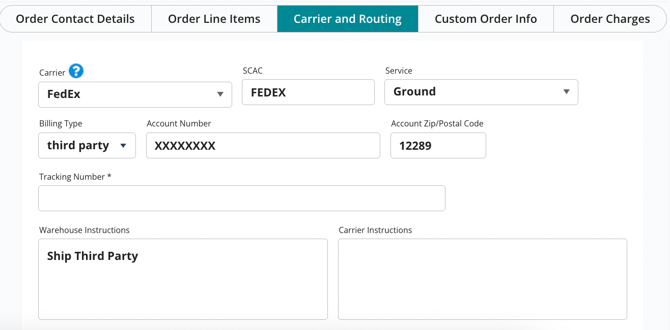
Enter the following in the CARRIER & ROUTING section of the order so we can release it correctly:
- Carrier (for example: UPS, FedEx, DH, etc)
- Service (Ground, 2 Day, etc)
- Billing terms: Third Party or Collect
- Carrier account number and billing postal code (UPS/FedEx require the account’s zip/postal; DHL requires the account number)
- Add warehouse instructions if there are special requirements (for example, “adult signature required,” “use 3 cartons,” or “do not rate shop”).
- Save order
- Submitting attached labels
Option A — Upload to the order in Extensiv
- Update the Warehouse Instruction in Extensiv to describe what is attached (ex. Carton labels attached)
- Attach a single PDF containing all labels in stop-sequence (carton 1, carton 2, etc.)
- Name the file: ORDERNUMBER_cartoncount.pdf (example: 12345_3ctns.pdf).
- Include any required documents (commercial invoice, packing list, retailer routing guide page).
Option B — Email labels
- Send to shipping@shipologyus.com with the order number in the subject.
- Attach a single multi-page PDF, or one file per carton clearly named.
- Include service level, account owner (company name), and any special instructions.
- Label specifications
- Format: 4×6 inch PDF is preferred; ZPL/EPL are accepted with prior coordination.
- Quality: 300 dpi equivalent, no cropping, no scaling.
- Content: correct ship-from/return address, ship-to, service level, and tracking for each carton.
- One label per carton; include master/pallet labels if required by the program.
- For LTL, provide the BOL and any PRO or routing docs.
- Multi-carton and weights
- Provide the total carton count in the order notes.
- If your labels were created with specific weights/dimensions, ensure the physical cartons match.
- If actual weight/dims differ materially, we will reweigh/remeasure; your carrier may rebill.
- Processing and timelines
- Orders with complete third-party details or valid attached labels will be released to the floor.
- Please allow normal pick/pack SLAs; if labels are missing or unclear, the order will be held.
- Same-day shipping requires labels and instructions before our daily cutoff.
- If your labels arrive after a carrier pickup, the order will ship the next business day.
- Photos and documentation
- If we identify packaging or label issues, we will take photos and notify you before proceeding.
- Corrections (relabel, rebox, add dunnage) can be performed per your approval; project fees may apply.
- Billing and responsibility
- Freight charges bill to the Third Party carrier account.
- If the third-party account rejects charges, the carrier may back-bill Shipology; those charges and any carrier fees will be passed through to you, plus an administrative fee.
- Shipology is not responsible for carrier compliance violations when labels are provided by the client (for example, incorrect service, address, hazmat declarations, or missing documents).
- International shipments
- Provide commercial invoices, AES/ITN when applicable, and any special program documents.
- Ensure the consignee and terms (DAP/DDP) on the label match the paperwork.
- Common pitfalls to avoid
- Missing billing postal/zip for UPS/FedEx third-party accounts
- Labels that don’t match the order’s ship-to or carton count
- Low-resolution or resized labels that won’t scan at pickup
- Rate-shop requests on third-party orders (not supported)
- Sending multiple versions of labels for the same order without clear instructions
- How to track
- Tracking numbers on attached labels come from the carrier; you can monitor delivery in your carrier portal.
- If we generate labels on your third-party account from our station, tracking will also appear on the order record in Extensiv.
Support
For questions or to set up a standing SOP for third-party or label-provided shipments, email shipping@shipologyus.com. Include example labels and your preferred carrier settings so we can apply them consistently.